AI-generated artwork inspired by “Analysis of variance”.
Analysis of Variance (ANOVA) is a statistical method that analyzes the variability of the observations in a dataset and compares it between groups or factor levels to determine if there is a statistically significant difference among them. This section covers the basics of ANOVA, and the following inferential methods for ANOVA:
An F-test to determine whether there is a statistically significant difference among three or more treatments or groups.
A non-parametric alternative to the F-test.
Multiple comparison methods to determine which specific groups or treatments have significant differences.
Equations/formulas used in hypothesis testing or confidence intervals will be kept at a minimum as the focus is on the use of software to carry out these methods. That being said, those new to or not comfortable with hypothesis testing or confidence intervals may want to consider reviewing Chapter 11.
To ensure that statistical inferential methods provide meaningful results, several assumptions are made about the data on which the method is intended to be used.
WarningData assumptions
The methods discussed here assume one or more of the following assumptions about the data:
Assumption 1. Independence of the observations. Each subject or observation is independent within and across the factor levels or groups or treatments.
Assumption 2. No clear outliers under each factor level or groups or treatments.
Assumption 3. Normality or large sample. The data under each factor level or group or treatment should be roughly normally distributed or the sample for each factor level or group or treatment should be large.
Assumption 4. Equal variance or spread. The variability in each factor level or groups or treatments should be approximately that of any other factor level or group.
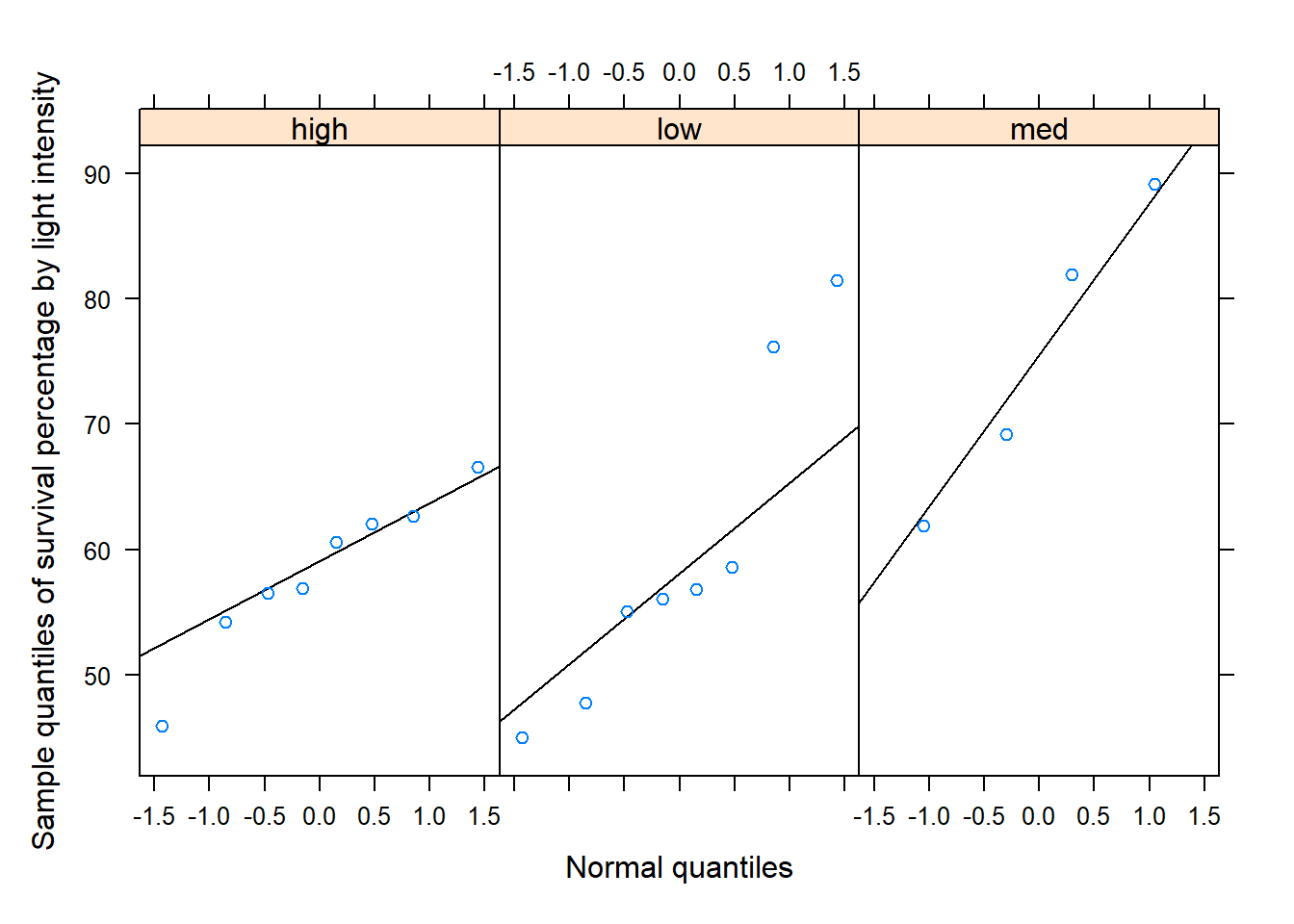
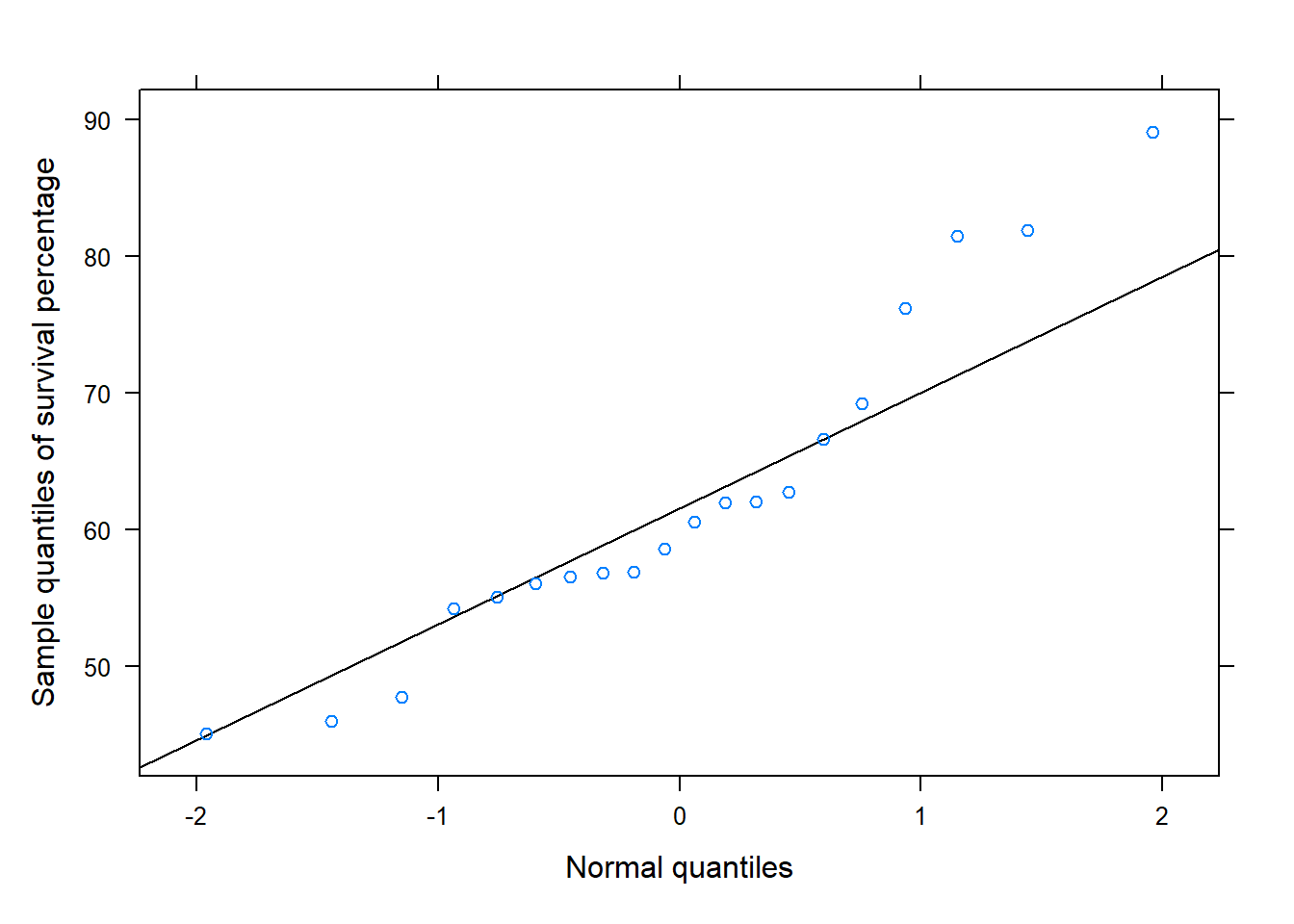
While these assumptions are addressed in the illustrations below using a case study, assumption 1 is assessed by considering how the study was conducted. Assumption 2 can be examined using histograms or boxplots for each group. For assumption 3, use QQ-plots within each group or a QQ-plot of the model residuals. Combining all groups in one QQ-plot can hide differences among them. Assumption 4 can be assessed using boxplots and sample standard deviations for each group.
The terms “factor levels”, “treatments”, and “groups” mean the same thing and will be used interchangeably, although “factor levels” or “treatments” are terms more associated with experiments and “groups” is a term more associated with observational studies. In these sections, R functions provided for conducting the aforementioned inferential methods are used and described. Other functions to import data, numerically or graphically summarize the data, and other tasks may be used but such functions are not described as they have been described and illustrated in detail in previous modules.
ImportantNotation
For readability, we define the following notation for ANOVA:
\(\mu_1\), \(\mu_2\), …, \(\mu_k\) denote the population or true mean response under each treatment \(1\), \(2\), …, \(k\), respectively.
\(\mu\) denote the population or true mean response across all treatments.
\(\bar{y}_1\), \(\bar{y}_2\), …, \(\bar{y}_k\) denote the sample mean response under treatment \(1\), \(2\), …, \(k\), respectively.
\(s_1\), \(s_2\), …, \(s_k\) denote the sample standard deviation under each treatment \(1\), \(2\), …, \(k\), respectively.
\(\bar{y}=\) sample mean response (across all treatments)
\(n_1\), \(n_2\), …, \(n_k\) denote the number of observations under each treatment \(1\), \(2\), …, \(k\), respectively.
\(n=n_1+n_2+\cdots+ n_k\) denote the total number of observations (across all treatment).
\(\eta_1\), \(\eta_2\), …, \(\eta_k\) denote the population or true median response under each treatment \(1\), \(2\), …, \(k\), respectively.
13.1 Single factor or one-way ANOVA
ANOVA partitions the total variability in the data (the sample variance of the all the data) in terms of variability between treatments and the variability within treatments. The variability between groups may be quantified by a measure called the mean square between treatments, denoted by \(MST\) or MS(Treatment)1. The variability within each treatment or group is quantified by the mean square error, denoted by \(MSE\) or MS(Error). The higher the MS(Treatment), the more the variability in the data are due to the differences among factor levels or groups. The higher the MS(Error), the more the variability in the data are due to differences within the groups. In ANOVA, the hypothesis are
\(H_0: \mu_1= \cdots=\mu_k\) (The mean response is the same across all factor levels or treatments)
\(H_a:\) Not all treatment means are equal; at least one pair differs.
To test the hypothesis, ANOVA compares the variability between groups to the variability within groups and it assesses whether the differences between group means are statistically significant. The ratio of these two measures provides the test statistic for the F-test in single factor ANOVA:
\[F=\frac{ MS(Treatment)}{ MS(Error)}\]
If the assumptions hold and the group means are equal, MS(Treatment) and MS(Error) should be similar, so their ratio tends to be near 1. If the group means differ, MS(Treatment) tends to be larger and the ratio increases. Under \(H_0\), we use an F distribution with \(k-1\) and \(n-k\) degrees of freedom to compute the p-value.
Welch’s ANOVA is used when the group variances are not assumed equal. It adjusts for differences in group sizes and variability. Its test statistic, \(F_w\), and degrees of freedom are computed differently from those of the standard F-test2. R does these calculations for us. The observations still need to be independent.
The function sfaov()3 obtains the information needed to conduct an F-test or Welch’s F-test and more using the data.
TipR functions
### sfaov( y ~ x , data , welch )
# y: Replace y with the name of the response (measured)
#  variable of interest.
# x: Replace x with the name of the factor or grouping
#  variable that distinguishes the different populations
#  or treatments.
# data: Set equal to the data frame name
# welch: Set to TRUE for Welch's unequal-variance ANOVA.
#        The default FALSE uses the common-variance ANOVA.
#
Many of the R functions used in these modules will have identical arguments. Therefore, while the arguments will be provided for any functions used, arguments such as y, x, data, and welch will generally no longer be described in this module.
Note
We use the data in Chapter 1 to compare mean survival percentages among the three light groups at \(\alpha=.10\). Keep in mind that the light groups also differ in turbidity. Therefore, the examples illustrate the methods, but cannot tell us whether light alone caused a difference.
To begin, we import the data, and then one would explore the data using numerical and graphical data summaries. Numerical and graphical data explorations were covered in other modules. However, we also use these type of summaries to assess model assumptions.
# Import data survdf<-read.csv("datasets/dssurv.csv")# Obtain the names of the variables in the data framenames(survdf)#> [1] "Light" "Turbidity" "Survival"# Load the dplyr packagelibrary(dplyr)# provides the mutate() function# Convert the "Light" and "Turbidity" variables to factors # using the mutate() function. survdf<-mutate(survdf, Light =as.factor(Light), Turbidity =as.factor(Turbidity))# Summarize the variables in the data frame using the summary() functionsummary(survdf)#> Light Turbidity Survival #> high:8 high:8 Min. :45.02 #> low :8 low :8 1st Qu.:55.79 #> med :4 med :4 Median :59.56 #> Mean :62.22 #> 3rd Qu.:67.24 #> Max. :89.09# Load the lattice package for graphing functionslibrary(lattice)bwplot(Survival~Light , # y ~ x data=survdf , # Specify data frame xlab="Light intensity level" , # Set x-axis label ylab="Survival rate" , # Set y-axis label main="Survival vs Light intensity" , # Specify plot title fill=c("gray", "brown", "cyan"))# Specify color for each plot
Code
# Source the function "normqqplot.R" so that # it's in R's memory.source("rfuns/normqqplot.R")# this function creates a normal QQ-plot# Create a normal QQ-plot under each groupnormqqplot(~Survival|Light , # ~ x | gfactor data=survdf , ylab="Sample quantiles of survival percentage by light intensity")
Code
# Create a normal QQ-plot across all groupsnormqqplot(~Survival, # ~ x data=survdf , ylab="Sample quantiles of survival percentage")
Code
# Load the mosaic package library(mosaic)# provides formula expression in sd()# Calculate the mean "Survival" for each "Light" levelmean(Survival~Light , data=survdf)#> high low med #> 58.18500 59.60625 75.51750# Calculate the standard deviation "Survival" for each "Light" levelsd(Survival~Light , data=survdf)#> high low med #> 6.345415 12.809045 12.242073
The medium-light group has a different sample mean from the low- and high-light groups. The group sizes are small, so it is difficult to assess normality. We should also check whether the groups were measured independently. The examples below show the calculations, but the study design and assumptions need further assessment before drawing firm conclusions.
The boxplots suggest that the variability is not the same for the three groups. To further assess this assumption numerically, we use the sample standard deviations. The sample standard deviations under light intensity 4.5 and 6.75 are similar (12.809 and 12.242), but the sample standard deviation under high light intensity is much less. To determine if the variability in both groups is similar enough, we can use a rule of thumb - take the ratio of the largest and smallest sample standard deviations (12.809/6.345 or 6.345/12.809), and if the ratio is between .5 and 2, then the variability in both groups is considered similar enough. Both graphical and numerical assessments suggest that assumption 4 is not reasonable for the data. However, keep in mind that graphical assessments of assumptions are generally enough, and this rule of thumb should not be used if outliers are present.
For illustration, we carry out the standard F-test even though some assumptions are uncertain. Let \(\mu_1\), \(\mu_2\), and \(\mu_3\) denote the true mean survival percentages for low, medium, and high light, respectively. The hypotheses are:
\[H_0: \mu_1=\mu_2=\mu_3 \qquad H_a: \text{Not all } μ_i\text{'s are equal}\]
In the context of ANOVA, we may also define the hypothesis in terms of an effect. Let \(\tau_i= \mu - \mu_i\), where \(\tau_i\) measures the effect of the \(i\)th factor level. The \(i\)th effect is the difference between the overall mean and the mean of \(i\)th factor level. In terms of effects, the hypothesis is
\[H_0: \tau_1=\tau_2=\tau_3=0 \qquad H_a: \text{Not all }\tau_i\text{'s are 0}\]
The following code uses sfaov() to compute the test statistic and the corresponding p-value for an F-test in single factor ANOVA:
# Source the function so that it's R's memory.source("rfuns/sfaov.R")# The function will require the following information:# y: Replace with 'Survival'.# x: Replace with 'Light'.# data: set equal to a 'survdf'.# welch: default is FALSE so it does not # need to be provided.sfaov(Survival~Light , data=survdf)#> One-way analysis of means (assuming equal variances) #> #> data: Survival ~ Light #> ============== #> ANOVA Table #> Df Sum Sq Mean Sq F value p-value#> Treatment 2 892.2 446.10 4.034 0.036839#> Error 17 1880.0 110.59 #> ============== #> #> R-squared= 0.322
The R output provides part of what is called an ANOVA table. An ANOVA table is a table that summarizes the results of an ANOVA test. It displays the sources of variation (Treatment [between groups], Error [within groups]), degrees of freedom, sums of squares, mean squares, F-test test statistic, and p-value4. Below is a general form of ANOVA table.
Source of Variation
Sum of Squares (SS)
Degrees of Freedom (df)
Mean Square (MS)
F-test Statistic
p-value
Treatment (Between)
SS(Treatment)
df(Treatment)
MS(Treatment)
F
p-value
Error (Within)
SS(Error)
df(Error)
MS(Error)
Total
SS(Total)
df(Total)
The output also provides the coefficient of determination or \(R^2\). \(R^2\) is a number between 0 and 1, and it measures the proportion of variability in the response that can be explained or accounted for by the factor variable, and it is defined as SS(Treatment)/SS(Total). The higher \(R^2\), the larger the proportion of the total variation that is accounted for by the factor variable. However, either a high or low value of \(R^2\) does not necessarily imply statistical significance.
The observed test statistic is \(F=4.034\), with a p-value of approximately \(.037\). Since the p-value is less than \(\alpha=.10\), we reject \(H_0\) if the assumptions hold. This suggests that the group means differ. However, the concerns noted above limit this conclusion, and the result does not show that light alone caused the difference.
Recall that not all data assumptions are met (assumptions 3 and 4 are questionable). Welch’s F-test does not require assumption 4. We will assume assumption 3 is met for the data to illustrate Welch’s F-test. To carry out Welch’s F-test, we use sfaov() but with an additional argument of welch=TRUE:
# The function will require the following information:# y: Replace with 'Survival'.# x: Replace with 'Light'.# data: Set equal to a 'survdf'.# welch: Set equal to TRUE.sfaov(Survival~Light , data=survdf, welch =TRUE)#> One-way analysis of means (not assuming equal variances) #> #> data: Survival ~ Light #> ============== #> ANOVA Table #> Df Sum Sq Mean Sq F value p-value#> Treatment 2.000 892.2 446.10 3.236 0.10081#> Error 7.037 1880.0 110.59 #> ============== #> #> R-squared= 0.322 #> #> Note: The Df for the Error component, F value and p-value provided are for Welch's F-test
The output is similar to that of the standard F-test. The F value, p-value, and df(Error) now correspond to Welch’s F-test. The df(Treatment) remains \(k-1\). The other summaries, including \(R^2\), have the same meaning as before.
Welch’s ANOVA gives \(F_w=3.236\) and a p-value of approximately .10081. Since the p-value is slightly greater than \(\alpha=.10\), we fail to reject \(H_0\). This means there is not enough evidence of a difference at the chosen significance level; it does not prove that the means are equal. Welch’s method allows unequal variances, but the other study limitations still apply.
13.2 Kruskal–Wallis test (single-factor ANOVA for ranks)
The Kruskal–Wallis test uses the ranks of the observations to compare independent groups. It does not require normally distributed data. If the groups have distributions with similar shapes and spreads, the test can be used to compare medians. If their shapes or spreads differ, a significant result may reflect those differences instead.
Like ANOVA, it partitions the total variability in the data but when using the ranks of the data (not the data themselves). For the Kruskal–Wallis test, the hypotheses are
\(H_0: \eta_1= \cdots=\eta_k\) (The median response is the same across all factor levels or treatments)5
\(H_a:\) Not all group medians are equal, assuming the group distributions have similar shapes and spreads.
Here MSranks(Treatment) describes differences among the groups using ranks, and SSranks(Total) describes the overall variation in the ranks. The test also accounts for tied observations. We use a chi-square distribution with \(k-1\) degrees of freedom to approximate the p-value.
The function sfkw()6 obtains the information needed to conduct the Kruskal–Wallis test using the data.
TipR functions
### sfkw( y ~ x , data )
#
Note
We use the Kruskal–Wallis test to compare survival among the three light groups at \(\alpha=.10\). As before, the observations need to be independent, and the light and turbidity differences cannot be separated in these data.
The data were imported and data assumptions were assessed when the F-test was applied in the previous section. Below we examine the medians and further explore the distribution of the data.
library(mosaic)# allows formula expression in median and iqrmedian(Survival~Light , data=survdf)#> high low med #> 58.720 56.420 75.525iqr(Survival~Light , data=survdf)#> high low med #> 6.2400 9.7375 16.3225
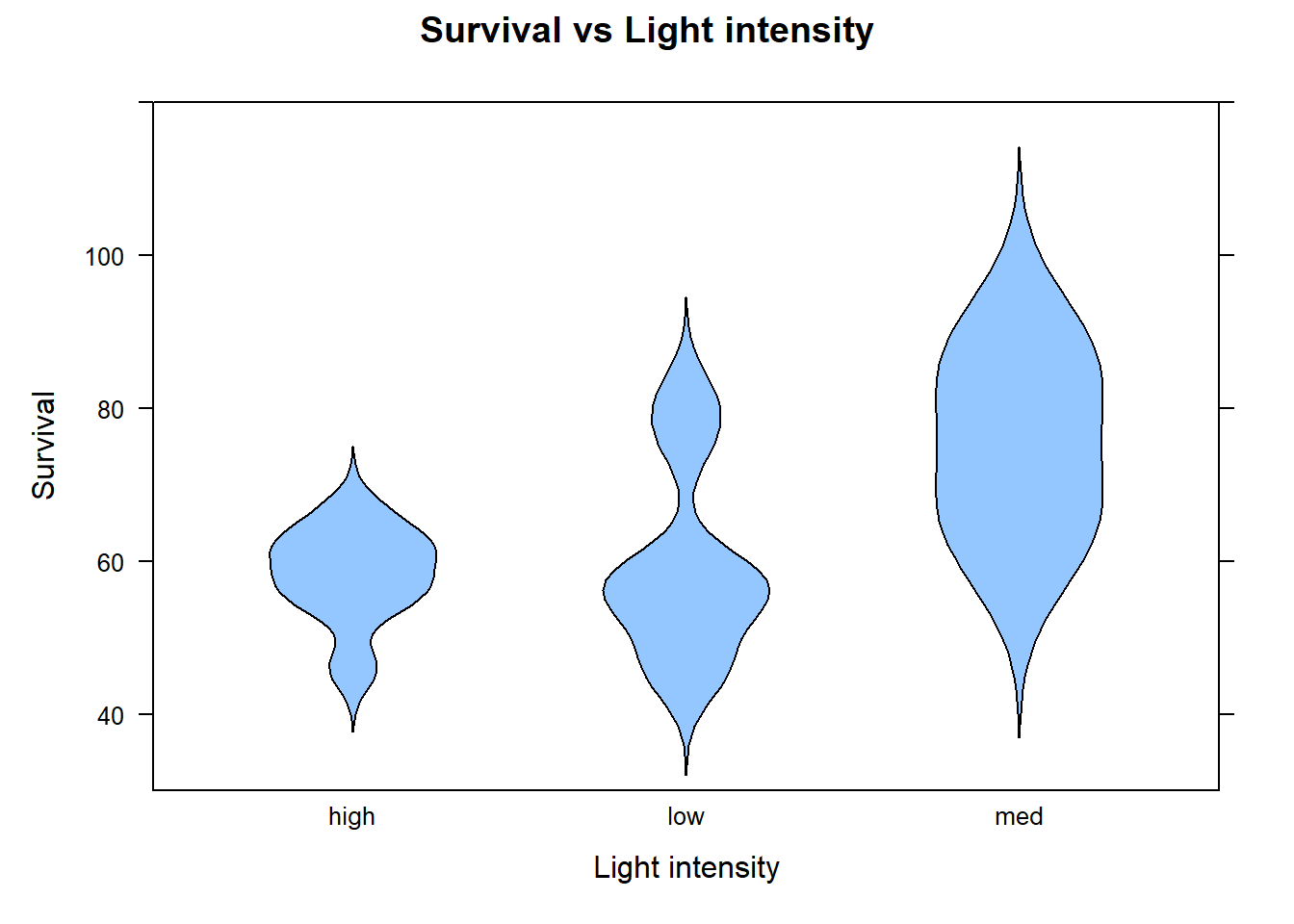
The difference in samples medians under intensity level 6.75 differs from intensity levels 4.5 and 9. The violin plots suggest that the data under each treatment do not all follow the same distribution. This means we cannot assess if the medians under each treatment differ but we formulate the hypothesis in terms of the mean of the ranks:
\(H_0:\) The mean ranks of survival under each light intensity are the same
\(H_a:\) Not all the mean ranks of survival under each light intensity are the same
The following code uses sfkw() to compute the test statistic and the corresponding p-value for the Kruskal–Wallis test:
# Source the function so that it's R's memory.source("rfuns/sfkw.R")# The function will require the following information:# y: Replace with 'Survival'# x: Replace with 'Light'# data: Set equal to a 'survdf'sfkw(Survival~Light , data=survdf)#> Kruskal-Wallis test (single-factor ANOVA on ranks) #> #> data: Survival ~ Light #> ============== #> Kruskal-Wallis test statistic= 5.668 #> p-value= 0.05878 #> Approximate null distribution is chi-squared with df= 2 #> ============== #> #> Eta-squared= 0.2157563
The output provides the Kruskal-Wallis test statistic and corresponding p-value. The output also provides a measure akin coefficient of determination in traditional ANOVA called rank Eta or eta-squared. The measure eta-squared is appropriate for when the data are ranks, and it provides the proportion of the total variation in the response variable that is explained by the explanatory variable. Again, Eta-squared can be considered a non-parametric analogue to \(R^2\).
The observed test statistic is \(H=5.668\), with a p-value of approximately .05878. Since the p-value is less than \(\alpha=.10\), we reject \(H_0\) if the assumptions hold. This suggests that the group distributions differ. Because their shapes differ, we cannot conclude from this test alone that their medians differ.
13.3 Multiple comparisons
If \(H_0\) is rejected, it implies significant differences between the treatments or groups. However, this result does not indicate which specific groups differ from each other. Multiple comparisons refer to the process of making all pairwise comparisons between two or more groups when there are significant differences between the groups. These comparisons can be accomplished using a two-sample methods on all possible pairs. The scenario of testing many pairs of groups is called multiple comparisons.
There are a few problems associated with blindly carrying out two-sample methods on all possible pairwise comparisons
The comparisons are not being done simultaneously and are being carried out individually with no regard to the other tests (comparisons).
The more pairwise comparisons conducted, the higher the chances of making at least one type I error among all the comparisons.
Multiple comparisons in ANOVA are used to determine which specific groups or treatments are significantly different from each other. These procedures adjust the p-value and confidence level of each comparison so that the family-wise error rate (the probability of making at least one Type I error across all multiple comparisons), is at most \(\alpha\). We discuss a few multiple comparison methods that control the family wise error rate (FWER).
13.3.1 Tukey’s HSD method
In ANOVA, the most common method for multiple comparisons is called Tukey’s Honest Significant Difference (HSD) method. Tukey’s HSD method is used in single-factor ANOVA, and it adjusts the p-value or confidence level for each pairwise comparison to control the FWER for all possible pairwise comparisons, rather than for individual comparisons.
Recall that the function sfaov() can be used to conduct single-factor ANOVA. This function can also then conduct Tukey’s HSD method to adjust the p-values or confidence intervals for all pairwise comparisons among group or treatment means.
TipR functions
### sfaov( y ~ x , data , PWC, conf.level )
# PWC: Set equal to true to conduct all pairwise comparisons using
#   Tukey's HSD method. Default is FALSE
# conf.level: Set equal to desired confidence level for all pairwise comparison. Default is .95
#
Note
The standard F-test gave evidence of a difference at \(\alpha=.10\). To illustrate how to identify which group means differ, we use Tukey’s HSD at the same significance level. The study limitations discussed above still apply.
The following code uses sfaov() to help conduct the ANOVA F-test and pairwise multiple comparisons using Tukey’s HSD method at \(\alpha=.10\)7.
# Source the function so that it's R's memory.source("rfuns/sfaov.R")# The function will require the following information:# y: Replace with 'Survival'.# x: Replace with 'Light'.# data: Set equal to a 'survdf'.# PWC: Set equal to TRUE.# conf.level: Set equal to .90.sfaov(Survival~Light , data=survdf , PWC=TRUE , conf.level=.90)#> One-way analysis of means (assuming equal variances) #> #> data: Survival ~ Light #> ============== #> ANOVA Table #> Df Sum Sq Mean Sq F value p-value#> Treatment 2 892.2 446.10 4.034 0.036839#> Error 17 1880.0 110.59 #> ============== #> #> R-squared= 0.322 #> #> #> Sample group means: high-58.18 low-59.61 med-75.52 #> #> Tukey multiple comparisons of means #> diff lwr upr p adj#> low-high 1.42125 -10.142221 12.98472 0.96061638#> med-high 17.33250 3.170198 31.49480 0.03898149#> med-low 15.91125 1.748948 30.07355 0.06006956
The output from sfaov() now provides the results of Tukey’s HSD method which displays the difference in the sample treatment means, confidence interval, and p-value for each pairwise comparison. Note that the first confidence interval compares low to medium light intensity (CI for \(\mu_1-\mu_2\) and p-value for testing \(\mu_1-\mu_2\neq 0\)). The comparisons that follow are for \(\mu_1-\mu_3\) and \(\mu_2-\mu_3\). Tukey’s HSD pairwise comparisons reveal significant differences in mean survival rates between different levels of light intensity at FWER of \(.10\). Specifically, the mean survival rate under medium light intensity is significantly different from both low and high light intensity (in terms of pairwise comparisons). Additionally, the mean survival rates between low and high light intensity were not significantly different from each other.
13.3.2 Games-Howell test
The Games-Howell test is a method for performing pairwise multiple comparisons when using Welch’s F-test. This test is somewhat similar to Tukey’s HSD method. Recall that the function sfaov() can be used to conduct Welch’s F-test. This function can also then conduct the Games-Howell test to adjust the p-values or confidence intervals for all pairwise comparisons among group or treatment means.
TipR functions
### sfaov( y ~ x , data , PWC, conf.level, welch )
# PWC: Set equal to true to conduct all pairwise comparisons using
#      Tukey's HSD method. Default is FALSE.
# conf.level: Set equal to desired confidence level for all pairwise comparison. Default is .95.
# welch: Set equal to TRUE for Welch's F-test.
#
Note
Welch’s F-test did not give enough evidence of different group means at \(\alpha=.10\). For illustration, we show how to carry out Games–Howell comparisons with 90% confidence intervals. The same study limitations apply.
The following code uses sfaov() to conduct the Welch’s F-test and all pairwise multiple comparisons using the Games-Howell test at \(\alpha=.10\):
# Source the function so that it's in R's memory.source("rfuns/sfaov.R")# The function will require the following information:# y: Replace with 'Survival'.# x: Replace with 'Light'.# data: Set equal to a 'survdf'.# PWC: Set equal to TRUE.# conf.level: Set equal to .90.# welch: Set equal to TRUE.sfaov(Survival~Light , data=survdf , PWC=TRUE, conf.level=.90, welch=TRUE)#> One-way analysis of means (not assuming equal variances) #> #> data: Survival ~ Light #> ============== #> ANOVA Table #> Df Sum Sq Mean Sq F value p-value#> Treatment 2.000 892.2 446.10 3.236 0.10081#> Error 7.037 1880.0 110.59 #> ============== #> #> R-squared= 0.322 #> #> Note: The Df for the Error component, F value and p-value provided are for Welch's F-test #> #> Sample group means: high-58.18 low-59.61 med-75.52 #> #> Games-Howell multiple comparisons of means #> groups diff lwr upr p adj#> 1 low : high 1.42125 -10.23181 13.074308 0.9575207#> 2 low : med -15.91125 -34.83432 3.011821 0.1680024#> 3 high : med -17.33250 -35.93898 1.273985 0.1203842
The R output from sfaov() now provides the results of the Games-Howell test and it displays the difference in the sample treatment means, confidence interval, and p-value for each pairwise comparison. Note that the first confidence interval compares low to high light intensity (CI for \(\mu_1-\mu_3\) and p-value for testing \(\mu_1-\mu_3\neq 0\)). The comparisons that follow are for \(\mu_1-\mu_2\) and \(\mu_3-\mu_2\). The Games-Howell test for pairwise comparisons reveal that there are no significant differences in mean survival rates between different levels of light intensity at FWER=\(.10\).
13.3.3 Dunn test
Dunn’s test compares the average ranks for each pair of groups. Holm’s correction adjusts the p-values to account for making several comparisons. The sfkw() function provides these results after the Kruskal–Wallis test8.
TipR functions
### sfkw( y ~ x , data , PWC )
# PWC: Set equal to true to conduct all pairwise comparisons using
#      Tukey's HSD method. Default is FALSE
#
Note
The Kruskal–Wallis test gave evidence that the group distributions differ at \(\alpha=.10\). The following Dunn comparisons help identify which pairs differ in their average ranks. These comparisons still cannot separate the effects of light and turbidity.
# Source the function so that it's in R's memory.source("rfuns/sfkw.R")# The function will require the following information:# y: replace with 'Survival'# x: replace with 'Light'# data: set equal to a 'survdf'# PWC: set equal to TRUEsfkw(Survival~Light , data=survdf , PWC=TRUE)#> Kruskal-Wallis test (single-factor ANOVA on ranks) #> #> data: Survival ~ Light #> ============== #> Kruskal-Wallis test statistic= 5.668 #> p-value= 0.05878 #> Approximate null distribution is chi-squared with df= 2 #> ============== #> #> Eta-squared= 0.2157563#> #> Sample group medians: high-58.72 low-56.42 med-75.525#> Comparison Z P.unadj P.adj#> 1 high - low 0.295804 0.76737978 0.76737978#> 2 high - med -2.035693 0.04178115 0.08356230#> 3 low - med -2.277216 0.02277331 0.06831993
The output from sfkw() now provides the results of Dunn’s test, displaying adjusted p-values (P.adj) for each comparison. Note that the first comparison is comparing low to medium light intensity with the last comparison being between medium and high light intensity. Dunn’s test for pairwise comparisons reveals significant differences in survival rates between different levels of light intensity at FWER of \(.10\). Specifically, the survival rate under medium light intensity is significantly different from both low and high light intensity (in terms of pairwise comparisons). Additionally, survival rates between low and high light intensity were not significantly different from each other. Note that the comparisons are being done in terms of mean ranks since the data distribution under each treatment did not follow the same shape.
13.4 Sample size estimation and power analysis for ANOVA
Ideally, estimating the sample size for a study is one of the first things that researchers do prior to collecting data. Knowing the required sample size to detect a desired effect at the beginning of a project allows one to manage their data collection efforts. Furthermore, this allows for one to determine how much statistical power the test will have to detect an effect if it exists.
The R function pwr.anova.test() from the pwr R package calculates statistical power for a balanced single-factor ANOVA, given the sample size, significance level (\(\alpha\)), and effect size. Note that all treatments are assumed to have the same number of observations, which is known as a “balanced” design. It is assumed that the appropriate assumptions about the data are met9.
TipR functions
### pwr.anova.test( n , delta , sd1 , sd2 , sig.level ,
###           power, alternative)
# k: Set equal to the number of groups/treatments.
# n: Set equal to the number of observations per group.
# f: Set equal to the effect size.
# sig.level: Set equal to the desired alpha value (significance level).
# power: Set equal to the desired power (a number between 0 and 1).
#
Cohen’s \(f\) describes how much the group means differ relative to the variation within the groups. Larger values indicate a larger effect. The standard deviation used here describes variation within groups, rather than variation in all observations combined. Common guidelines are:
Small effect size: \(f = 0.10\)
Medium effect size: \(f = 0.25\)
Large effect size: \(f = 0.40\) or higher.
These are suggested guidelines and may vary slightly depending on the specific field of research or context of the study.
Note
Suppose we want to determine the statistical power to detect a medium-sized effect assuming five observations per group and at significance level of \(\alpha=.01\) and \(\alpha=.10\). Recall that there are three groups:
Code
# Load the "pwr" packagelibrary(pwr)# Provides pwr.anova.testpwr.anova.test(k =3 , n =5 , f =.25 , sig.level =.01)#> #> Balanced one-way analysis of variance power calculation #> #> k = 3#> n = 5#> f = 0.25#> sig.level = 0.01#> power = 0.02811243#> #> NOTE: n is number in each group
The statistical power of this test is low. To increase the power, one may increase the effect size (the larger it is, the easier it is to detect), increase \(\alpha\) (make it easier to reject \(H_0\) and find a significant effect), and/or increase the number of observations per group.
The MST is also commonly referred to as the mean square between groups (MSG).↩︎
The exact calculation used here is implemented by R’s oneway.test(..., var.equal=FALSE).↩︎
sfaov() is a wrapper function for aov(), oneway.test(), and TukeyHSD() and it incorporates additional options. A wrapper function is a function that calls another function or a set of functions to simplify or extend tasks↩︎
SS(Treatment) refers to the sum of squares Treatment. The rest of table elements are defined in an analogous manner for the SS, df, and MS. SS(Total) is a measure of the total variation in the data, ignoring the groups or treatments. The sum of squares treatment or SS(Treatment) measures how far the individual sample means are from the overall sample mean, and the sum of squares error or SS(Error) measures how far observations are from the sample mean of its group.↩︎
If the groups have different shapes or spreads, interpret a significant result as evidence that their distributions differ, rather than only their medians.↩︎
sfkw() is a wrapper function for kruskal.test() but it incorporates additional options.↩︎
Significance or \(\alpha\) level equals one minus the confidence level. For example, if \(\alpha=.05\), the corresponding confidence level is \(1-\alpha=1-.05=.95\).↩︎
The function reports adjusted p-values for the comparisons, rather than confidence intervals.↩︎
There are R functions to compute for the Kruskal-Wallis test or Welch’s F-test, these functions may be difficult to use for those not familiar with power analysis.↩︎